
Public Sector Back-Office Modernization Without Disrupting Daily Operations
Public sector back-office modernization is the work of updating the internal systems that manage records, payments, approvals, reporting and communication, without interrupting the services people rely on. Over time, these systems accumulate years of operational knowledge, integrations and exceptions that employees depend on to complete their work.
Modernization has to account for that history. Staff still need to process requests, finance teams still need accurate figures, and managers still need reliable reports while changes are being introduced.
A practical approach begins with understanding these dependencies and planning manageable releases around daily operations.
Start Public Sector Back-Office Modernization with the Workflows People Depend On
Before choosing new technology, map how work actually moves through the organization.
An apparently simple record update may affect a payment, a regional report, an external export and the information another department sees. Some of these dependencies will be documented; others may exist only in an experienced employee’s routine.
Discovery should involve the people who use the system, alongside those responsible for maintaining it. Identify critical workflows, recurring deadlines, manual workarounds and integrations that would cause operational problems if they failed.
This gives the modernization plan a clear business foundation: which changes will reduce administrative effort, improve data quality or make the system easier to maintain?
Introduce Back-Office Modernization Changes in Manageable Stages
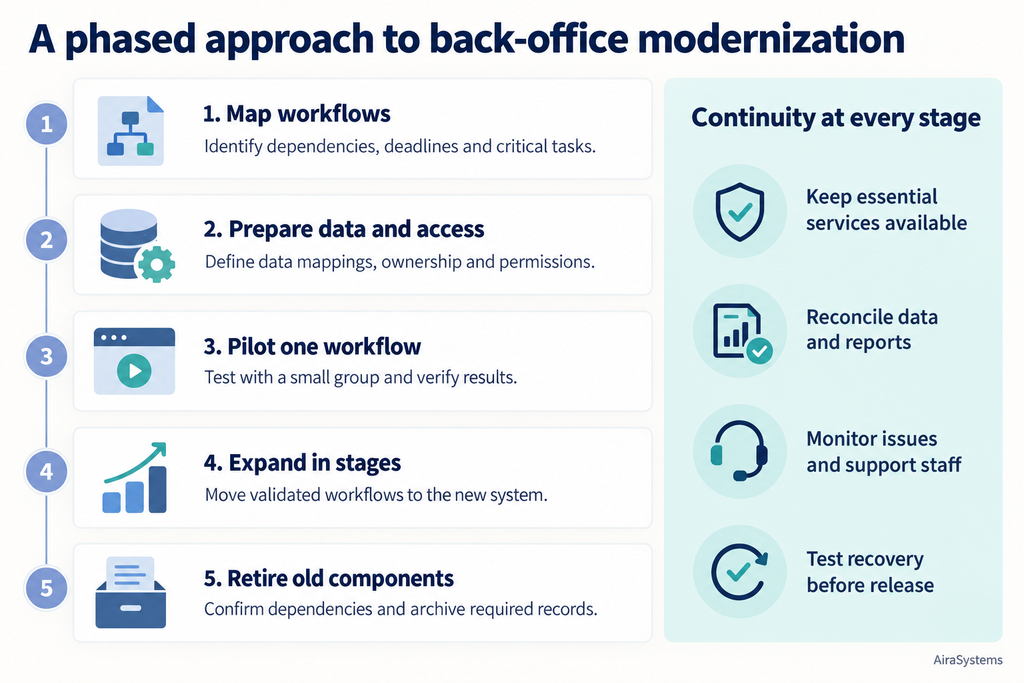
A phased approach allows selected functions to move to a new implementation while other parts of the existing system continue operating.
For example, an organization might begin with a reporting interface that reads existing data, then improve a specific approval workflow before addressing more interconnected financial processes. The sequence should reflect dependencies and operational risk.
The Strangler Fig pattern provides one way to organize this transition: requests gradually move to new components as individual capabilities are replaced. Microsoft’s architecture guidance describes this approach as a way to reduce the risk of incremental migration.
Each stage should have clear acceptance criteria, a responsible operational owner and a decision about when the old functionality can be retired. Otherwise, a temporary transition can become a permanent burden of maintaining two systems.
Treat Data Migration as an Operational Responsibility
Historical data often contains inconsistent formats, duplicate records and fields whose meaning has changed over time. Moving it successfully requires understanding how staff use it.
Before migration, define how records, identifiers, statuses and relationships map to the new structure. Agree which information remains active, which should be archived and how historical records will remain accessible.
Rehearsals should verify both technical accuracy and business outcomes. Matching record counts is useful, but teams also need to check whether balances reconcile, documents remain linked and important reports produce the expected results.
If both systems remain active during the transition, define where each type of data can be updated. Uncontrolled editing in both places can create conflicting records. The plan must also explain how changes made after the initial transfer will reach the new system.
Review Access Alongside the Workflows
Public sector back-office systems often serve several departments, regional teams and levels of responsibility. Permissions need to reflect those differences.
A staff member may need access to local records without being able to view another region’s information. Someone who prepares a payment may require different permissions from the person who approves it.
Public sector back-office modernization is an opportunity to review these rules with operational owners. Define access by role, organizational scope and action, then enforce it in the backend as well as the interface.
Permission checks should include restricted scenarios: whether users can retrieve another team’s records, export sensitive information or perform an action outside their authority. Audit records should preserve who changed important information and when.
Plan Continuity Before the Release
Operational continuity requires preparation beyond choosing a deployment date.
A release plan should account for payment runs, reporting deadlines and other periods when disruption would be particularly costly. A pilot with a smaller group can help reveal workflow issues before broader adoption.
Teams also need a tested recovery plan. Returning users to an older application version may be insufficient if the new system has already changed data or processed transactions. Recovery must address those changes and any external actions that have taken place.
After release, monitoring should cover operational results: failed exports, missing records, delayed approvals and unexpected differences in reports. Staff need a clear support contact and guidance focused on the tasks that have changed.
Lessons from Complex Internal Systems and Back-Office Modernization
Our team’s long-term work with VSOA Police Belgium provides relevant experience with these challenges. VSOA is a police union, and its internal platform combines membership administration, financial workflows, communication, reporting and regional access rules.
Although this is a union system rather than a government back-office platform, it illustrates how closely connected administrative functions can become. A change to a member’s status can have consequences across several workflows, while permissions must accommodate different responsibilities and organizational boundaries.
That experience informs our approach at AiraSystems: understand the processes behind the software, examine the dependencies and plan changes around the people who keep the organization running.
A successful modernization should produce measurable improvements, such as less repeated data entry, more reliable reporting, clearer access rules and easier maintenance, while keeping essential work moving throughout the transition.
Technical reference: Microsoft Azure Architecture Center — Strangler Fig pattern
Read more about modernization – How to Upgrade Legacy Government Applications (Step-by-Step)